
Superbuy Shipping Calculator: Build an Estimate You Can Recheck
A Superbuy shipping calculator result is only as useful as the inputs saved with it. Before comparing route prices, record the destination, warehouse, contents and parcel measurements. Then you can explain why a later result changed.
The public estimator displays weight in grams and dimensions in centimetres. Check units before submitting; a correct number entered in the wrong unit produces a different parcel description.
Prepare one input record
Keep these fields together rather than collecting isolated price screenshots:
| Input | What to preserve |
|---|---|
| Destination | The actual destination selected |
| Warehouse | The warehouse used for the estimate |
| Contents | Accurate item descriptions and relevant category |
| Weight | Value, unit and whether it is estimated or measured |
| Dimensions | Packed length, width and height with units |
| Date | When the estimate was produced |
A product's fit measurement is not a packed dimension. For example, the inseam of trousers cannot be substituted for a parcel side. Keep garment measurements in the size guide workflow and parcel measurements in this record.
Identify which inputs are provisional
Before packing, some values may only be estimates. Label them as such. Do not describe a seller's item weight as a measured packed parcel weight.
If several items will be combined, their arrangement and packaging introduce another question. Record assumptions used in an early comparison and replace them with actual parcel information when available.
The warehouse guide helps keep item receipt and parcel preparation distinct. A collection of warehouse items does not by itself supply the final box dimensions.
Understand a volumetric example without treating it as a quote
The public calculator FAQ illustrates volumetric weight with length × width × height divided by 6,000, using centimetres to obtain kilograms. That example does not establish the divisor or billing rule of every route.
For hypothetical arithmetic only, a 40 × 30 × 20 cm box gives 4 kg under that formula. This is not a measured customer parcel, available route or shipping price. Its purpose is to show why dimensions can matter even when the contents are light.
Check the selected service's own rule before using a calculation in a price decision, including how it handles chargeable weight and any rounding.
Run comparisons with controlled changes
To compare two packing assumptions, keep the destination and contents constant while changing the relevant measurements. Label each scenario so that the lower amount is not accidentally attached to the wrong box.
To compare routes, use the same parcel inputs. Review what each result includes rather than sorting by the displayed amount alone.
The shipping guide covers eligibility, inclusions and the limits of per-kilogram averages. An attractive estimate is not a reason to ignore a content restriction.
Check restrictions independently of a selectable category
The estimator also displays prohibited-item information. A category appearing in the interface is not permission to send every product with that name.
In this capture from 1 October 2026, the restriction notice appears above the category choices. The country shown is USA, while the parcel's weight and three dimensions are empty. Use it to locate the checks that come before a search, not to infer a price or the eligibility of your own contents. It also shows why saving just a category name is insufficient for a later comparison.
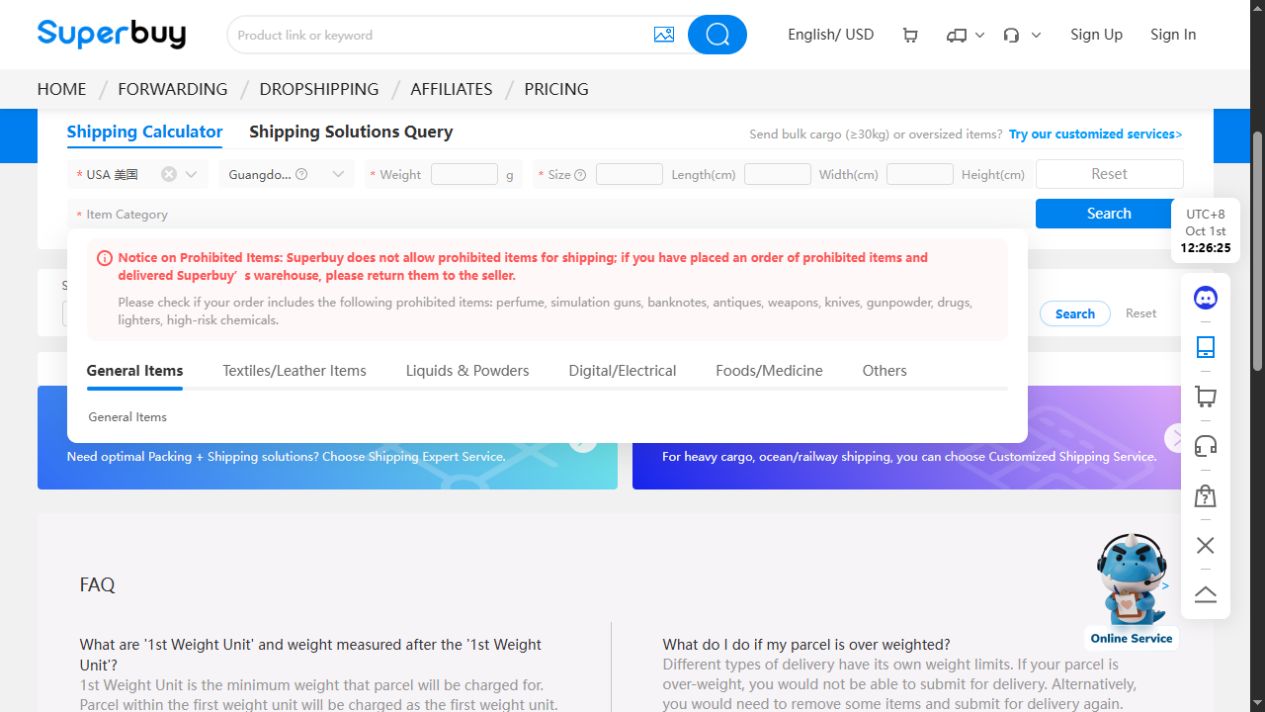
Describe the actual contents accurately and clarify any conflicting information before proceeding. Do not remove a relevant battery, liquid or branded-item detail from the description simply to make a result appear. The other-items guide explains the distinction between browsing categories and shipping classification.
Diagnose an empty or changed result carefully
If no route appears, recheck units, required fields and the selected destination and category. Preserve any displayed message. An empty result does not, by itself, establish a global outage or permanent lack of service.
If the same inputs produce a different amount later, retain both dated observations. Do not invent the cause: availability, service conditions and other factors require actual evidence before attribution.
Use the support guide to prepare a concise enquiry with the inputs and message. Share private order details only through an appropriate private channel, not in a public article image.
Keep estimate, parcel amount and payment separate
After parcel preparation, compare the actual inputs and displayed charge with your earlier estimate. A difference is a question to reconcile, not automatically evidence of an error.
Keep the payment record separately. A calculator screenshot does not prove a payment, and a payment does not prove delivery. Follow the tracking guide for subsequent parcel events.
Can the calculator guarantee the final cost?
An estimate should not be treated as a completed transaction or universal final charge. Review the actual parcel and applicable service details before acting.
Should I always use 6,000 as the divisor?
No. It is the formula shown in the general FAQ example; the selected route's applicable rule must be checked.
What makes a useful screenshot?
The relevant inputs, result, date and explanatory context, with personal identifiers removed and permission to use the image. A cropped price alone cannot establish a comparable quote.
Add this footwear reference to your input notes on Superbuy. Supply packed weight and dimensions separately, or clearly label preliminary assumptions. A catalogue image cannot provide the measurements needed for a reproducible freight estimate.